


IQAir AirVisual | Air Quality
4.77.56K Reviews
App Specs
- Version
- 7.4.0-12.12
- Updated On
- License
- Free
- Downloads
- 5,000,000+
- Developer
- IQAir AG
- Categories
- Weather
- Platform
- Android, iOS
Screenshots
 Analysis by AppCompare
When several people share a home, checking the air can become a small but useful part of planning the day. I might look before opening the windows, while someone else checks before a run or a school pickup. IQAir AirVisual | Air Quality is built around air-quality information rather than a broad mix of weather details, so it can help turn a vague concern about haze or smoke into a more informed conversation.
I find that distinction helpful in a household: one person’s reading can guide a shared decision, but it should not be treated as a command everyone must follow. Air conditions can vary by place and time, and people have different sensitivities and plans. The app works best as a reference point that helps us ask better questions—whether to exercise outside, ventilate now, or check again later—not as a substitute for personal judgment.
One household, different reasons to check
A realistic routine might begin on a hazy morning. I check the local reading before taking a longer walk, then share the report with a relative who plans to cycle later. The useful part is not simply passing along a color or a number; it is pairing the reading with the time and the activity. A brief outdoor errand and a sustained workout are different choices, even when they happen in the same neighborhood.
That makes the app especially relevant for households where someone has allergies, prefers to exercise outdoors, or wants to keep an eye on wildfire smoke. It can also help people who travel between neighborhoods compare what they are seeing with conditions elsewhere. By contrast, if I only need rain timing, temperature, or a quick forecast for deciding what coat to wear, a conventional weather app may be the faster one-stop choice.
Set up around the person using the phone
Because the app is free and available to a broad audience, it is easy to imagine installing it on a shared tablet or letting different household members check it on their own phones. I would still make the setup personal: confirm that the location shown is the place I actually care about, and check it again after travel rather than assuming yesterday’s view still answers today’s question. A reading for home is not automatically useful for a different part of town.
On a shared device, account and location boundaries deserve a little thought. I would avoid treating one person’s saved locations or notifications as a family-wide arrangement unless everyone understands what is being used. If several people need separate preferences, individual devices can be simpler than passing one phone around. The app’s sharing of reports can support coordination, but it is not the same thing as a household dashboard or a family-control system.
Sharing information without overreacting
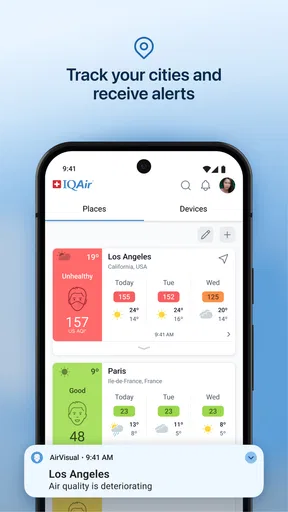
Notifications can be useful when I do not want to keep opening the app, but I would choose them with care. Too many alerts can turn a helpful signal into background noise, especially for someone who checks conditions only occasionally. A practical approach is to use alerts when changing air quality could affect a planned routine, then open the app to see the broader context rather than reacting to a notification alone.
Worth Reading Before You Choose

Flipboard Shows What News Apps Must Do Beyond the Feed

Switching to Android Auto Means Rethinking Your Driving Routine

Google Calendar Makes a Crowded Week Easier to Manage

Ludo King Makes the Most of the Minutes Between Plans

Baby Panda World Brings Quick Play to Modern Phones, but Its Game Library Feels Busy

ESPN’s Live Game View Makes Following Close Games Easier
When I send a report to someone else, I try to include what decision it is meant to inform. “The air looks worse than earlier; perhaps check before the run” is more useful than a bare screenshot that may be separated from its context. Sharing is most helpful when it starts a conversation, not when it implies that everyone should make the same choice.
Age, trust, and sensible expectations
The app is rated for Everyone, which makes its subject accessible to a wide age range. I would still explain the colors and pollutant terms to a younger user instead of expecting a label to carry the whole meaning. AQI and particle information can prompt useful questions, but a simplified visual indicator is not a personal medical assessment. For someone with health concerns, the app can inform everyday planning without replacing advice from a qualified professional.
Trust also depends on understanding what the app is showing. IQAir AG develops this weather app, and its focus on air conditions gives it a more specialized role than a general forecast tool. Its average rating is 4.7 from around 338,000 ratings, with over 5 million installs, which suggests broad use; popularity is reassuring context, though I would still judge it by whether its local information is useful for my own routine.
Why You Need to Know About Air Quality
Before diving into the app itself, let’s chat about why air quality is such a big deal. With pollution levels on the rise, knowing the quality of the air around you can impact your daily life. Whether you’re a fitness enthusiast who loves running outdoors or just someone trying to avoid allergies, understanding air quality is crucial.
Getting Started with IQAir AirVisual
Installing the app was a breeze. It’s available on both Android and iOS, so no worries about compatibility. Once you open the app, the interface is super user-friendly. You’re greeted with a clean dashboard showing the current air quality index (AQI) of your location. No complicated settings or overwhelming data to sift through.
The app uses a color-coded system to indicate air quality levels, which is a neat touch. Green means you’re all clear, while red signals poor air quality. It’s intuitive and easy to read at a glance.
Features That Stand Out
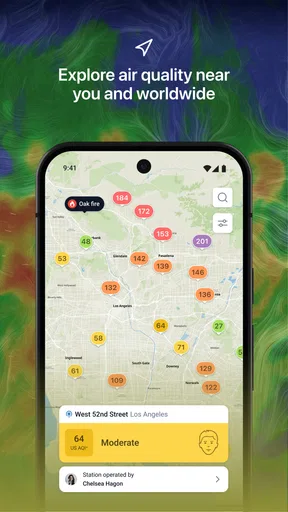
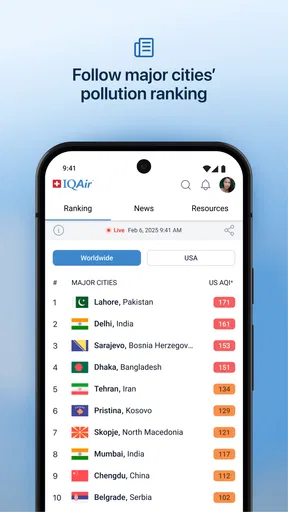
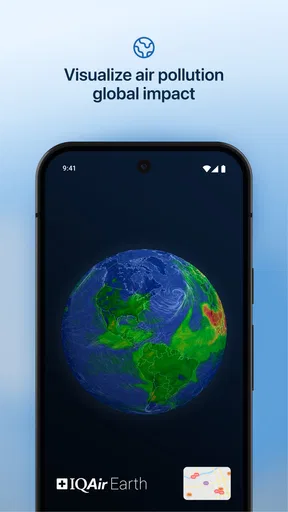
Now, let’s talk features. One of the coolest aspects of IQAir AirVisual is the global coverage. It doesn’t matter if you’re in New York or New Delhi; the app provides real-time data from a vast network of sensors worldwide.
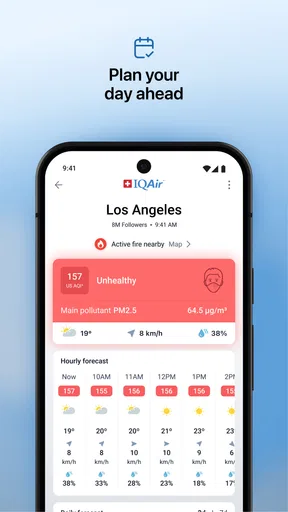
Another feature I love is the forecast option. Just like checking the weather, you can see air quality predictions for the next few days. This is perfect for planning outdoor activities. Plus, you can set up notifications to alert you when air quality changes, which I find super handy for those unexpected smog days.
Digging Deeper with Additional Insights
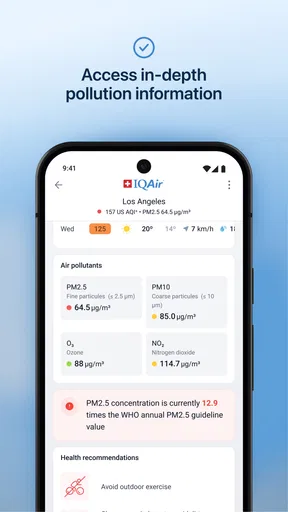
Curious about what’s causing the pollution? The app breaks down the major pollutants contributing to the AQI. It provides insights into PM2.5, PM10, ozone, and more. It’s like having a mini science lesson in your pocket!
For those who are data geeks, there’s a section dedicated to historical data. You can track trends over time, which is pretty fascinating and can help you notice patterns in your area.
Making It Social
What’s a modern app without a social aspect, right? You can share air quality reports with friends and family. It’s a great way to spread awareness and keep everyone informed.
Reading forecasts as planning tools
The forecast is most valuable to me when I use it to compare possible plans, not to promise exactly what the air will be like at a particular moment. If I have a flexible outdoor workout, I can check ahead and decide whether to move it, shorten it, or keep it outside. If the plan is fixed, a forecast still helps me prepare, but I would check current conditions again before heading out.
That distinction matters because air quality is not as familiar to many people as temperature or rain. A weather forecast often answers a simple question—will I need an umbrella?—while an air-quality forecast can require thinking about duration, exertion, and individual sensitivity. I appreciate having the information together, but I would not use a single forecast view as a medical threshold or assume that a favorable reading guarantees comfort for everyone.
Local readings and the limits of comparison
Global coverage is a real advantage when I travel or want to understand whether a smoky period is confined to my area. It also makes the app more useful than a local-only tool for comparing places. Still, broad coverage does not mean every point on a map should be interpreted as equally representative of a front door or a park. Conditions can differ over short distances, and a sensor reading is a guide to an area rather than a promise about the air at every street corner.
My practical tip is to use nearby information consistently. If I am deciding about a regular walking route, I look at the same relevant location over time rather than switching among distant readings just because one looks more reassuring. Historical trends can help distinguish a one-off change from a recurring pattern, while the current reading helps with today’s choice. Neither view replaces what I can see, smell, or learn from local public guidance during a serious smoke event.
When the detailed view earns its place
For someone who is curious about pollution sources, the pollutant breakdown offers more than a single overall indicator. I find it useful for learning that “air quality” is not one substance and for understanding why two days with similar-looking summaries may have different contributors. PM2.5, PM10, and ozone are not interchangeable, and the extra detail can make a trend more meaningful than a color alone.
There is a trade-off: more detail can also invite overinterpretation. If I am not going to use pollutant information to change a routine or build understanding, the top-level reading may be enough. The deeper figures are best treated as context, not a reason to diagnose symptoms or draw conclusions from one isolated check. That makes the app approachable for casual users while still giving curious users something to investigate.
Choosing between this and a general weather app
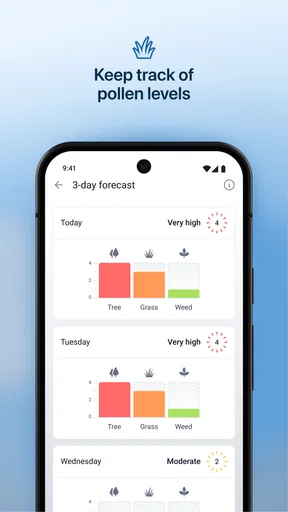
I would keep this app close if air pollution is a recurring concern, if I plan outdoor exercise around conditions, or if I want to follow wildfire and pollen information alongside air-quality forecasts. A typical weather app is often more convenient for everyday questions about temperature, precipitation, and wind. AirVisual’s advantage is its emphasis on air conditions, pollutant detail, and looking back at changes rather than simply adding an AQI badge to a weather screen.
There is no need to make it the only weather app on a phone. I can use a general forecast for the day’s clothes and this one when the quality of the air could change what I do. Someone who rarely thinks about pollution and mainly wants a quick glance at ordinary weather may find a separate specialist app unnecessary. The right choice depends on whether air-quality information changes a real decision often enough to justify its own place on the home screen.
What to expect before installing
AirVisual is free, has an Everyone age rating, and its current version is 7.3.5-1.1. It first appeared on November 26, 2015, and the combination of a straightforward dashboard with more detailed views makes it approachable without making every user dig into technical information. I would start with the local reading and forecast, then explore the pollutant and historical sections only if they answer a question I actually have.
One practical question is whether it is useful without constant attention. In my view, yes: a quick check before a planned outdoor activity can be enough, and alerts are an option for people who want updates without repeatedly opening the app. Another is whether it works for a household. It can support shared decisions through report sharing, but each person should still check that the location and timing fit their own plan rather than assuming one screenshot settles the matter.
It is also fair to ask whether the app can tell me exactly what to do. I would not expect that. It gives information that helps me weigh an activity against conditions; personal health needs, local advice, and how long or intensely I will be outside still matter. If I want only a basic weather forecast, I would choose a general-purpose alternative. If I want to understand air quality over time and use that knowledge in daily planning, this focused tool makes more sense.
Wrapping It Up
To sum it up, IQAir AirVisual | Air Quality is more than just an app; it’s a tool that empowers you with knowledge about the air you breathe. Its comprehensive features, from real-time data to forecasts and historical trends, make it an essential app in today’s world.
Whether you're concerned about pollution, planning an outdoor adventure, or just curious about your environment, this app has got your back. So, why not give it a try and breathe a little easier knowing what’s in the air?
My household verdict
I would recommend it to a friend who wants a clearer basis for outdoor plans, especially when air quality is a regular concern for more than one person at home. The app’s strongest role is helping people notice conditions, compare them over time, and share a useful snapshot. It is not a replacement for a full weather service, a medical tool, or a guarantee that every nearby location has identical air.
The household approach I trust most is simple: check the relevant place, connect the reading to the activity, and share it with enough context that another person can make their own decision. That keeps the information practical rather than alarming. If that is how you want to use air-quality data, I think this app is worth trying; if you only need ordinary weather at a glance, a broader forecast app may suit you better.
Pros
- Provides real-time air quality updates.
- Covers multiple global locations.
- User-friendly interface design.
- Customizable notifications for alerts.
- Detailed pollutant breakdown available.
Cons
- Requires constant internet for updates.
- Some features need premium access.
- May drain battery with GPS use.
- Occasional data sync delays.
- Limited offline functionality.
FAQs for IQAir AirVisual | Air Quality
What features does the IQAir AirVisual app offer?
The IQAir AirVisual app provides real-time air quality data, forecasts, and historical data for thousands of locations worldwide. It offers personalized health recommendations, pollution alerts, and the ability to track multiple locations. The app also includes educational resources to help users understand air pollution and its effects on health.
Is the IQAir AirVisual app free to use?
Yes, the IQAir AirVisual app is free to download and use. While it offers comprehensive data and features at no cost, additional features or ad-free experiences may require in-app purchases or subscriptions. Always check the app's store page for the most up-to-date pricing information.
How accurate is the air quality data provided by the app?
The IQAir AirVisual app sources its data from a combination of government monitoring stations and validated IQAir sensors. While it strives for high accuracy, users should be aware that data can vary based on location and the density of monitoring stations. Always consider cross-referencing with local sources for critical needs.
Does the app require an internet connection to function?
Yes, the IQAir AirVisual app requires an internet connection to fetch and update real-time air quality data. However, once data is downloaded, it can be viewed offline. For the most accurate and up-to-date information, ensure you have a stable internet connection when using the app.
Can the IQAir AirVisual app be used internationally?
Absolutely, the IQAir AirVisual app is designed for global use. It provides air quality data for a wide range of international locations, making it a valuable tool for travelers and expatriates. Users can easily switch between different cities and countries to monitor air quality worldwide.


